
Cheeka
TRENDOR PTE. LTD.Tools
4.4740.00 Reviews
- Version
- 1.1.4
- Installs
- 100.00K
- Age Rating
- Mature 17+
Screenshots

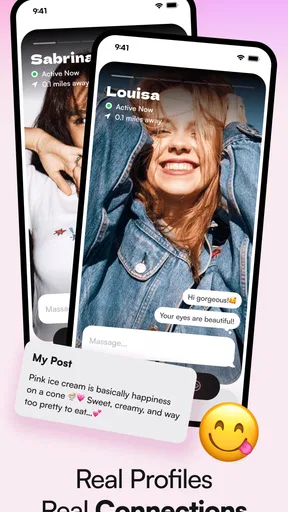


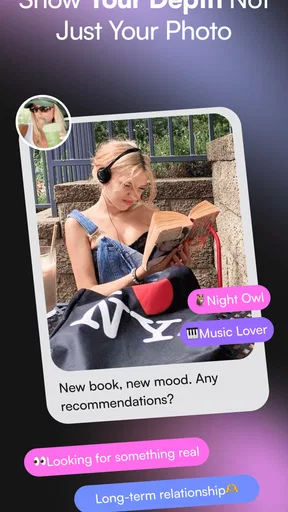
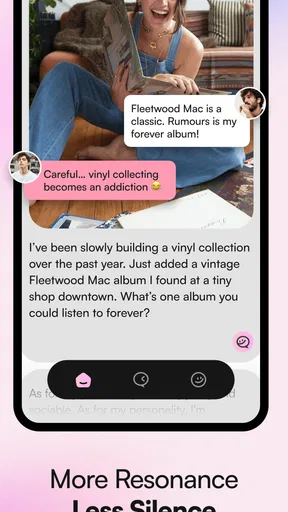

Our Review of Cheeka
 Analysis by Appyee
I approached Cheeka as a practical tool for situations where personal conversations, shared devices, and household boundaries can easily overlap. Its short store description, “Cheeka,” gives away very little, while the broader summary, “Love Made Easy,” points toward a relationship-focused experience rather than a general utility. After spending time with it, my main impression is that it is best treated as a private, mature-oriented app for personal use—not as a family organizer, parental-control tool, or shared household dashboard.
That distinction matters. A shared phone or tablet can make almost any personal app feel more complicated than it first appears. Someone may borrow the device, notifications may appear at the wrong moment, or two people may assume they are using the same account when they are not. Cheeka can fit comfortably into a couple’s routine, but only when everyone understands whose account is active, who can see the device, and when the app should remain private.
How Cheeka Fits Into Real Household Use
I find Cheeka works best when I think of it as a personal app that may support a couple’s routine, rather than as something for the whole household to share. Before bringing it into a shared space, I’d decide who will use the account and how to keep the experience comfortable for everyone else. That context makes the next question—what to settle before installing it—much easier to answer.
A relationship app that works best with one clear user
In my experience, the most sensible way to use Cheeka is with one person’s account and one clearly defined purpose. That might mean keeping it on a personal phone for private relationship-related use, checking it during quiet time, or using it as a conversation starter between partners. I would not install it casually on a family tablet and assume that the whole household can use it without friction.
The reason is not that shared devices are automatically unsafe. The issue is context. A relationship-oriented app can contain material that feels personal even when the device itself is used by several people. A partner might be comfortable with it, while a child, guest, or visiting relative would not expect to encounter it. Keeping the app tied to the intended adult user avoids awkward explanations and reduces the chance of someone opening it accidentally.
A realistic example would be a couple who share a tablet in the living room but use their phones for private matters. I would put Cheeka on the personal phones, not the shared tablet. The tablet can remain available for streaming, shopping, or household planning, while the relationship app stays within the space where both users already expect personal content. That simple separation is more useful than trying to turn a shared screen into a universal device.
What to decide before installing it
Before using Cheeka around other people, I recommend agreeing on three basic boundaries: which device will hold it, which person will sign in, and whether notifications should appear while the device is visible to others. These are ordinary decisions, but they prevent most of the confusion that can surround a private app on a shared device.
I would also avoid switching between two people’s accounts on the same device unless the app clearly makes that workflow comfortable. Repeated account changes can lead to the wrong person seeing the wrong screen, especially when someone opens the app in a hurry. A dedicated personal device is usually the cleaner option. If that is not possible, signing out after use and keeping the device locked when unattended are sensible habits.
Cheeka is free to install, which makes trying it straightforward, but that should not be confused with unlimited use at no cost. The app includes in-app purchases ranging from $0.99 to $499.99 per item. I would review any purchase screen carefully before confirming anything, particularly if a shared device uses a payment method that several household members can access. The wide purchase range is a strong reason to keep buying decisions explicit rather than treating the app as a harmless free download.
Coordination between partners
The most promising use case is not silently handing the app control of a relationship; it is using it as a shared reference point for conversations. I found that the value of a relationship tool usually comes from what two people do with its prompts or suggestions afterward. If Cheeka encourages a topic, the useful step is to discuss it together rather than simply tapping through and assuming the app has solved anything.
For a couple with different schedules, a simple routine can help. One person can explore the app during a quiet moment, note what feels relevant, and bring it up later when both people have time. That is less intrusive than interrupting a busy workday with a sudden demand for attention. It also creates a useful boundary: the app may start the conversation, but the couple decides when and how to continue it.
I would not use it as a replacement for direct communication. If there is a serious disagreement, a sensitive trust issue, or a decision involving money or living arrangements, an app should not become the messenger. Cheeka may be useful for opening a lighter conversation or adding variety to a routine, but important matters still need plain language, patience, and mutual consent.
Another practical tip is to avoid treating the app as a test of affection. If one partner enjoys exploring it and the other does not, that difference should not automatically be interpreted as a relationship problem. The better approach is to agree on what each person is comfortable trying. This is especially important when the app is used on a device that both partners can reach, because physical access to a phone does not equal permission to inspect someone’s private activity.
Account boundaries are more important than the device
Shared-device use often creates a false sense that everything on the screen is communal. I would keep Cheeka’s account boundary separate from the household’s general technology habits. A partner may be invited to participate, but that invitation should be deliberate. A roommate, sibling, or child should not be assumed to have access simply because the phone or tablet is left on a table.
This also affects notifications. I would check how alerts behave during setup and consider disabling or limiting visible previews if the device is regularly seen by other people. I am not claiming a particular notification-control feature beyond the normal device settings; the point is to inspect the phone’s own privacy controls before relying on the app in public or shared spaces.
For households with multiple adults, writing down a simple agreement can sound excessive, but it can be helpful: this is one person’s account, purchases require approval, and nobody opens it without permission. That small conversation is more reliable than hoping everyone will infer the rules. It also makes the app easier to recommend to a partner without creating the impression that installing it grants automatic mutual access.
Age context and trust
Cheeka carries a Mature 17+ content rating, so I would treat age context as a central part of the installation decision. It does not belong on a child’s profile or on a device that a younger family member uses freely. Adults should also remember that an age label is not a substitute for discussing whether the app suits a particular relationship, household, or personal comfort level.
For parents, the practical answer is separation rather than experimentation. Keep adult-oriented apps on adult devices, use the operating system’s existing account and screen-lock features, and do not rely on a child simply agreeing not to open something. I would not present Cheeka as a parental-control solution because its purpose is different. If the household needs content filtering, supervised accounts, or activity limits, a dedicated family-safety product is a better fit.
Trust works both ways. A partner should not install Cheeka secretly to monitor, test, or pressure the other person. Nor should someone demand access to the other person’s account as proof of commitment. The app can be part of a consensual shared experience, but privacy remains meaningful even inside a close relationship. That is one of the most important boundaries to establish before making it part of a couple’s routine.
The Mature 17+ label also changes how I would recommend it to younger adults who share housing. A university apartment, group house, or family home may contain several people with different expectations about privacy. If the device is communal, I would choose a personal phone and avoid leaving the app open. That is not a criticism of Cheeka specifically; it is a sensible response to the app’s intended age context.
What the current app profile suggests
Cheeka is developed by TRENDOR PTE. LTD. and is available as a free app in the tools category. Its current version is 1.1.4, and it requires Android 8.0 or later. Those details make it accessible to many Android users without requiring a recent flagship phone, although compatibility alone does not answer the more important questions about privacy, household fit, or purchase boundaries.
The app has an average rating of 4.4 from around 9,100 ratings, with over 700 written reviews, and it has passed 100,000 installs. That gives me some confidence that it has attracted a real audience, but I would still read recent user comments before committing to paid features. Ratings are useful for spotting broad satisfaction; they do not tell me whether the app matches my particular expectations about shared devices, account separation, or mature content.
The release date is December 17, 2025, so I would approach it as a relatively new product rather than a long-established household standard. A newer app can feel fresh and focused, but it may also change more noticeably as the developer refines the experience. I would keep expectations realistic and check the version shown on the device after updates instead of assuming that an early impression will remain identical over time.
Where it beats ordinary alternatives
Compared with a general notes app, Cheeka has a more focused relationship context. A notes app can record plans or questions, but it leaves the user to invent the structure. Cheeka is more appealing when I want something designed around romantic connection rather than another blank page. That focus can reduce the effort needed to begin a conversation, especially for people who know they want to improve their routine but do not know what to ask.
Compared with ordinary messaging, it can also create a little distance from the constant stream of work updates, links, and household logistics. Messaging is excellent for quick coordination, but it can turn a meaningful exchange into another notification thread. A dedicated relationship app may encourage users to pause and give the topic more attention.
On the other hand, a calendar, shared to-do list, or family organizer is better for practical coordination. If the goal is remembering appointments, dividing chores, tracking school events, or managing groceries, Cheeka is not the right tool. Its relationship angle does not replace a household management system. I would use a calendar for commitments and Cheeka, if it suits both partners, for the personal side of staying connected.
A private journal may be better for someone who wants complete control over wording and no relationship-oriented framing. A therapist, counselor, or trusted professional is better for serious emotional difficulties. Cheeka can complement those options in limited situations, but I would not ask it to carry responsibilities that belong to direct support or professional care.
Small habits that make the experience more useful
My first practical suggestion is to use it at a predictable time rather than opening it whenever boredom appears. A short evening check-in, a weekend coffee, or a quiet moment before a date gives the app a place in the routine. The goal is not to spend as long as possible inside it; the goal is to turn one useful idea into a real interaction.
Second, keep a distinction between private exploration and shared participation. One partner may want to browse alone, while another may prefer to look together. Both approaches can be valid. Asking before sharing a prompt or suggestion avoids making the other person feel examined. This is a subtle but important difference between using a tool collaboratively and using it to steer someone without their agreement.
Third, treat purchases as a household decision whenever the device or payment method is shared. Because individual items can range from very small amounts to $499.99, I would never let a child or uninformed guest use the purchase flow. I would also avoid assuming that “free” means every meaningful part of the experience is included. Read each screen, confirm the amount, and make sure the person paying knows exactly what is being selected.
Finally, review whether the app is helping after a week or two of normal use. Is it leading to better conversations, or is it creating pressure, distraction, or unnecessary spending? If it becomes another source of notifications or disagreement, removing it may be the healthiest choice. A relationship tool should support mutual interest, not become an obligation.
Who should install it—and who should skip it?
I would recommend Cheeka to adults who want a focused relationship app, are comfortable with its Mature 17+ positioning, and can keep its account on a personal or clearly controlled device. It makes the most sense for couples who enjoy guided conversation, want to add variety to their routine, or prefer a dedicated experience over a blank notes page.
I would skip it for a child’s device, a completely communal tablet, or a household that needs shared calendars and task management rather than relationship content. I would also be cautious if either partner feels pressured to install it, share an account, or make purchases. In those cases, the problem is not a missing feature; the app simply is not the right starting point.
Android users with an older compatible phone can try it without paying an upfront download price, provided they are comfortable reviewing the in-app purchase screens. iPhone users should verify availability on their platform before planning a shared routine, since the Android details alone do not establish how another operating system handles the app.
My household verdict
Cheeka is most convincing when I imagine it in the hands of two consenting adults who keep their accounts and devices clearly separated from the rest of the household. Its relationship focus gives it a reason to exist beyond a standard notes or messaging app, and its free entry point makes a cautious trial easy. The growing user base and 4.4 average suggest that many people find the concept worthwhile, although I would still judge it by my own comfort with the content and purchase flow.
My reservation is that the same focused, mature character that makes it useful for couples makes it unsuitable as a general family app. It should not be installed on a child-accessible device, treated as a parental-control system, or used as a substitute for honest communication. The broad in-app purchase range also deserves attention in any household where payment access is shared.
My final recommendation is simple: use Cheeka privately first, agree on boundaries before involving a partner, and move anything genuinely important into a direct conversation. For the right adult couple, it can be a helpful prompt for connection; for a shared family device, it is better left off the communal screen. That balance is what makes the app worth considering without pretending it can organize every kind of household relationship.
Verdict
Strengths of Cheeka
- Simple interface makes browsing and discovering content easy.
- Quick access to profiles and core features on mobile devices.
- Useful for meeting people with similar interests and preferences.
- Profile customization helps users present themselves clearly.
- Suitable for casual social interaction without a steep learning curve.
Limitations of Cheeka
- Some features may require registration or additional personal details.
- The quality of interactions depends heavily on the local user base.
- Privacy settings should be reviewed carefully before sharing information.
- Inactive or incomplete profiles can make matching less effective.
- Notifications may become distracting if not adjusted in the settings.
Similar Picks in This Category
View All
Google LLC4.0

Gboard - the Google Keyboard
Google LLC4.5

Google Play services
Google LLC4.3

Google Play Store
Google LLC4.9

Files by Google
Google LLC4.5

SHAREit: Transfer, Share Files
Smart Media4U Technology Pte.Ltd.4.3
Frequently Asked Questions
What is Cheeka and what can I use it for?
Cheeka is a social communication app designed to help users connect, chat, and interact with other people through a mobile device. Depending on the version available in your region, it may include profiles, private conversations, community features, media sharing, or discovery tools. Before downloading, check the current store description because available functions, supported countries, and the app’s target audience can change over time.
Is Cheeka free to download and use?
Cheeka can generally be downloaded without an upfront payment, but some features may require in-app purchases, subscriptions, credits, or other paid options. These costs can apply to premium communication tools, enhanced visibility, additional content, or account upgrades. We recommend reviewing the pricing section in the Google Play Store or Apple App Store before registering, especially if the app is intended for frequent messaging or social interaction.
Is Cheeka safe and suitable for all users?
The app’s suitability depends on its age rating, community rules, and the type of interactions it allows. Users should avoid sharing sensitive information such as passwords, financial details, home addresses, or private identification documents. If Cheeka includes contact with strangers or user-generated content, younger users should have parental guidance. Always use blocking and reporting tools when available and review the privacy policy before creating an account.
What permissions and personal information does Cheeka require?
During installation or first use, Cheeka may request access to information such as your email address, phone number, camera, microphone, photos, notifications, or approximate location. The exact permissions depend on the features you choose to use and whether you create a profile or share media. Grant only the permissions that are necessary, and check your device settings later to revoke access you no longer want to provide.
What should I do if Cheeka does not work or I want to delete my account?
If Cheeka crashes, fails to load, or messages do not send, first check your internet connection, update the app, restart your device, and confirm that the service is not experiencing an outage. Clearing cached data or reinstalling may also help, although you should confirm that your account information is synchronized. For account deletion, look in the profile or privacy settings, or contact official support and request removal of your data.
